New Heaven Stand codes for September 2025 bring fresh boosts, powerful stands, and rare items to elevate your Roblox gameplay. Grab these rewards before they expire and strengthen your character for the toughest battles ahead.
So, this is the perfect time to gain your experience by getting a head start from the available Heaven Stand codes. Use the free cash to buy new abilities and beat the players online.
All New Heaven Stand Codes
We’ve got you covered-here’s a concise subtitle paragraph for the article:
All New Heaven Stand Codes unlock fresh abilities, boost your in-game power, and expand your Roblox adventures with updated codes released in September 2025.
If you’d like it more casual or punchier, tell me the tone you prefer.
- VergilHeadStart: Get 50k cash (NEW)
- sorryforevilbug: Get 100k cash (NEW)
- sorryforevilbug2: Get 75k cash
- freedom: Get 100k cash
- finallyfree: Get Skin Orb
- SuperEvilCode: Get 1 cash
- SuperNiceCode: Get 50k cash
Expired Heaven Stand Codes
- JetstreamSamfoundDEAD
- ShadowDioSweep
- EvilShutdown
- iforgotemoticonsimsorry
If you’re a fan of such arena-based games, consider trying out Anime Battle Arena, Heroes Battlegrounds, and Force Battlegrounds as well. Moreover, you should check out our Roblox game codes master list, as here are some of the best experiences you can try on this platform.
How to Redeem Heaven Stand Codes
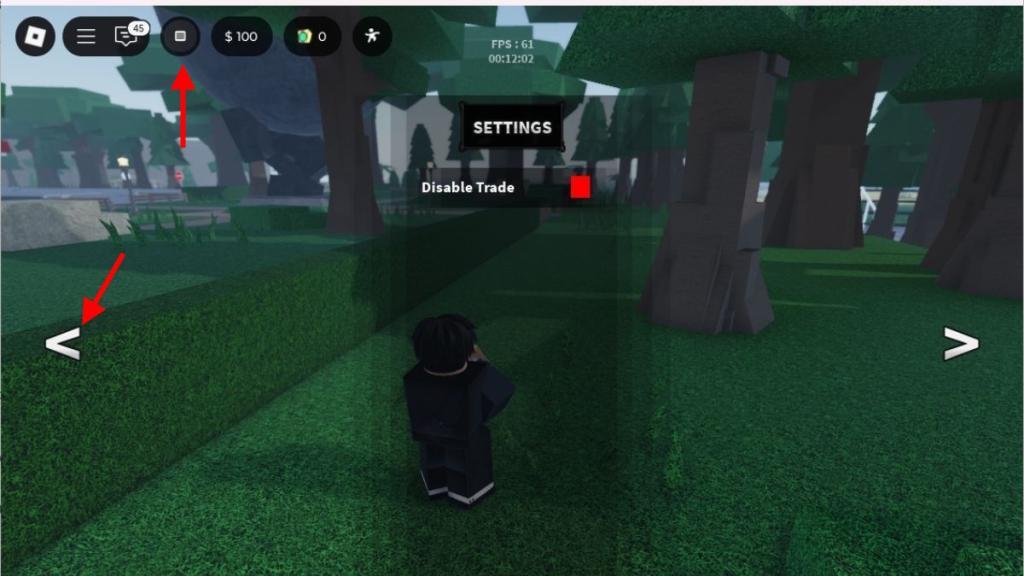
To redeem Heaven Stand codes, open the game on Roblox and tap the menu icon on your screen. Select the “Settings” button, then find the code redemption box that appears. Type or paste a working code exactly as shown and press “Enter” or “Redeem.” If the code is valid, your rewards will be added to your account instantly.
For redeeming the codes for Heaven Stand, you must join the Discord server first. Then you can follow the steps below:
- Launch Heaven Stand on your Roblox app.
- Click on the Menu icon on the top left of the screen, and click on the left arrow.
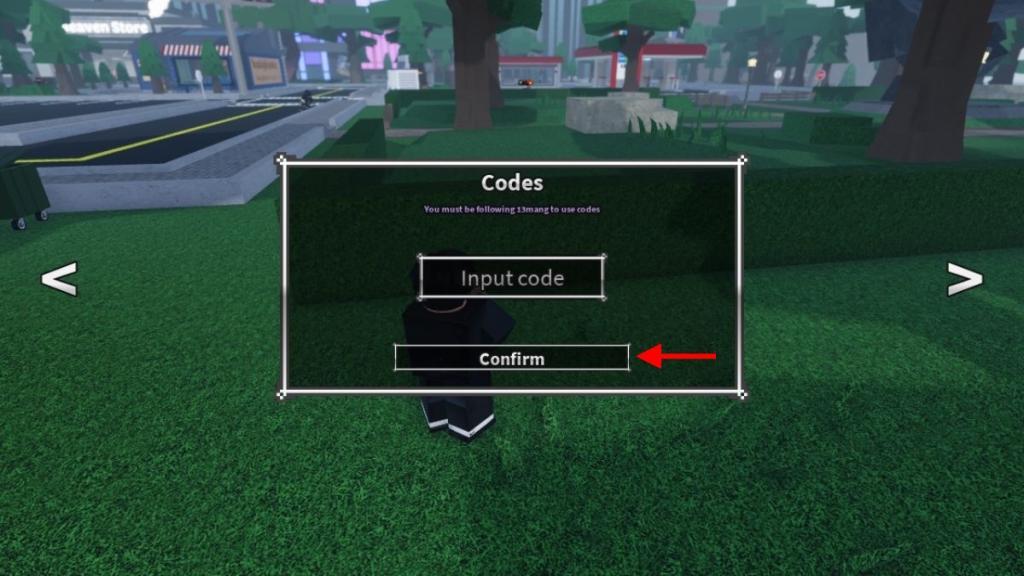
- Type any active code in the text area of the window.
- Click on the Confirm button to get your rewards.
How to Get More Heaven Stand Codes
Check the Heaven Stand Discord server and Roblox group for new code announcements from developers. Follow the official X account and Trello board, where updates drop regularly. Join community hubs like Reddit’s r/HeavenStand or fan Discords to spot player-shared codes first. Bookmark code-tracking sites such as Rolimons or Beebom that list active ones. Redeem codes quickly since they expire fast, and test them in-game right away.
The best way to get more codes on this game is by bookmarking this page by pressing the Ctrl D or Cmd D button. Since we keep this list updated at all times, it will be really easy for you to keep track of the new rewards dropped in the game.
Secondly, you can consider joining the official Heaven Stand Discord server as well. Here, you will find the list of all active codes in the ‘updates‘ channel. Finally, you should definitely join the Heaven Stand : Studio community to stay updated on all sorts of in-game news.
How to redeem Heaven Stand codes step by step
Heaven Stand is a Roblox game where redeeming codes provides free cash, orbs, and other rewards to enhance gameplay.
Step-by-Step Redemption
Follow these precise steps to redeem codes in Heaven Stand, ensuring accuracy to avoid errors.
-
Launch Heaven Stand on Roblox and ensure you’re in-game.
-
Press the M key on your keyboard or tap the square/menu button (top-left or bottom-left corner, depending on interface).
-
Click the left arrow button to navigate to the codes tab in the menu.
-
Enter a valid code exactly as listed (case-sensitive) into the text box.
-
Hit Confirm or Enter to claim rewards instantly.
Tips for Success
Codes may fail if expired, mistyped, or on outdated servers-try rejoining a server or verifying group membership if required. Active codes like ChristmasAtLast work as of January 2026 updates.
Show the in-game menu path to the code box
Heaven Stand’s code redemption menu is accessed via a specific in-game path on Roblox.
Menu Path Overview
The menu starts with a small icon or key press, leading directly to the codes section.
-
Open the main menu by pressing M or tapping the square icon (top-left or bottom-left screen corner).
-
Use the left arrow buttons (typically 1-2 clicks) to scroll left through tabs until reaching the Codes tab (often labeled with a gift/code icon).
-
The code input box appears prominently in this tab, with a Confirm button below it.
Visual Notes
This path matches mobile/PC interfaces; arrows cycle tabs like Settings > Codes. If tabs are hidden, ensure you’re not in combat mode.
