Amid a sea of blocks and brackets, Roblox Peacekeepers unlocks a fresh wave of rewards with August 2025 codes.
But how do you get better weapons at the beginning when there is not enough money with you? So, check out these latest Peacekeepers codes that can grant you free credits, chests, and more, using which you can upgrade your arsenal and skins as well.
All New Peacekeepers Codes
The latest Peacekeepers codes for August 2025 provide players with fresh opportunities to earn free rewards such as cash, boosts, and exclusive items that help progress faster in the game. Redeeming these active codes allows you to strengthen your character, gather useful resources, and enjoy a smoother experience while taking on missions and challenges. Make sure to check regularly for new additions, as some codes may expire quickly or be replaced with special event rewards.
- ilovepeace: 15000 Credits (NEW)
- targetaudience: 5 Legendary Crates (NEW)
- notsosmartai: 5000 Credits (NEW)
- absolutelyterrible: 15 Rare Crates
- realismisnot_theway: 1 Legendary Crate
- dogkeepers: 45 Common Crates
Expired Peacekeepers Codes
As of now, there aren’t any expired codes in the game, so grab the rewards right away.
If you are a fan of such intense games, consider checking out similar titles like Rivals, Arsenal, and War Tycoon. If you would like to try something new, check out our Roblox game codes master list, as here you will find lots of games that can cater to your taste.
How to Redeem Peacekeepers Codes
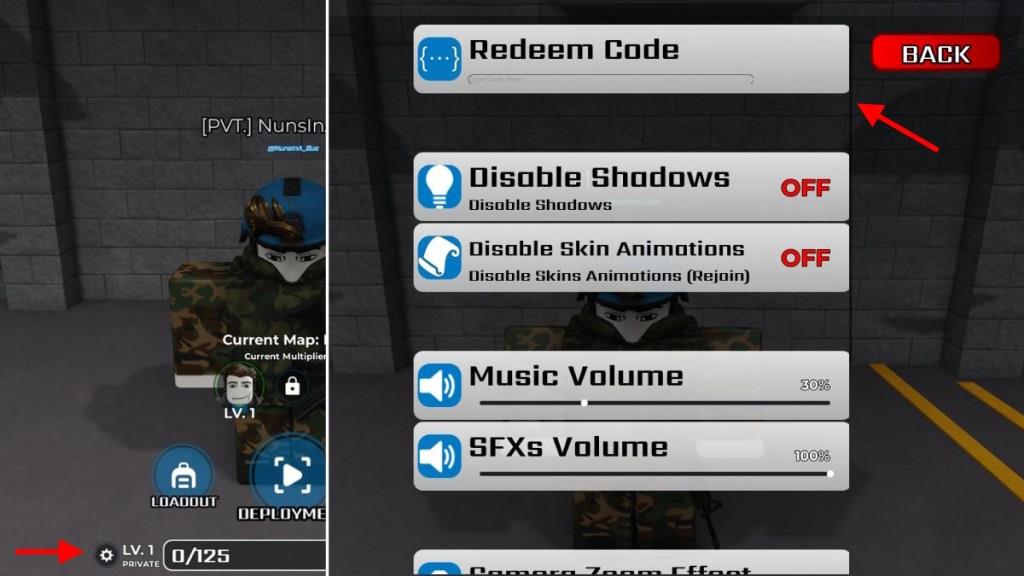
To redeem codes in Roblox Peacekeepers, launch the game and find the Settings menu, usually in the top-right corner or main lobby. Click the Codes or Redeem button to open the input box. Enter a valid code exactly as listed, without spaces or extra characters, then hit Submit or Redeem. Rewards like cash or boosts appear in your inventory right away if the code works. Check back monthly for new ones, as they expire quickly.
So, if you can’t wait to step into the battlefield, get all your free rewards from the codes for Peacekeepers in the following simple steps:
- Launch Peacekeepers on your Roblox app.
- Click on the Settings icon at the bottom of the screen.
- Type any active code in the text area at the top of the pop-up window.
- Click on the Redeem button to get your rewards.
How to Get More Peacekeepers Codes
New Peacekeepers codes are often released through the game’s official social media channels, such as Twitter, Discord, or the Roblox group page. Players can follow these pages or join the community to stay updated on new giveaways or special events that may include code drops. Checking fan forums and update posts on trusted Roblox gaming websites also helps track active and expired codes quickly.
Now that you know what all the current codes in the game are, you might be eager for more. So, bookmark this page right away such that you don’t miss out on any rewards. We update this list from time to time, and hence you won’t have any problems in the future.
Next up, you can join the official Peacekeepers Discord server as well. Here, you can find all the new ones in the “codes” channel. Finally, you can consider joining the official Peacekeepers Community on Roblox to know about all the game news.
How to redeem Peacekeepers codes step by step
Redeeming Peacekeepers Codes
To redeem codes in Roblox Peacekeepers, access the in-game settings menu for quick entry.
Step-by-Step Guide
-
Launch Peacekeepers through the Roblox platform and join a server.
-
Locate the gear or cogwheel icon at the bottom of the screen, typically next to your level indicator, and click it to open settings.
-
In the settings menu, find the “Redeem Code” text field at the top, enter or paste the code exactly as shown (codes are case-sensitive), and press Enter or tap the Redeem button.
-
Successful redemptions add rewards like credits or crates to your inventory instantly; invalid codes will show an error message.
Open Peacekeepers and show where the settings cog is located
Launching Peacekeepers
Open Roblox, search for “Peacekeepers,” and join the game to load into a server.
Locating the Settings Cog
The settings cog (gear icon) appears at the bottom center of the screen, near your level or player stats once in-game.
Visual Guide
Clicking this icon opens the menu with the code redemption field at the top; refer to gameplay videos for screenshots showing the exact bottom-screen position.