Steal a Brainrot hands players godlike control through its admin commands-master them to bend the chaos to your will.
List of Admin Console Commands in Steal a Brainrot
This section lists all admin console commands available in Steal a Brainrot. Players with admin access enter these in the console to manage servers, moderate users, or test features. Commands include kick, ban, mute, teleport, speed adjustments, and spawn controls. Check the full table below for syntax, permissions, and examples. Use them responsibly to keep gameplay fair.
Note that there are no Steal a Brainrot codes, so these commands are the best way to give yourself some advantage in the game. It’s always better to know what kind of effects you are messing with when using the admin console in Steal a Brainrot. With that said, here’s the full list of commands:
| Admin Command | Effects |
|---|---|
| ;rocket | Launch the player as a rocket and fly for a brief duration |
| ;ragdoll | Use the ragdoll physics on a player and knock them down |
| ;balloon | Turn the head into a balloon and fly for 15 seconds |
| ;inverse | Invert controls for 10 seconds |
| ;nightvision | Grants night vision for 1 minute |
| ;jail | Locks down the player for 10 seconds |
| ;control | Play as the player and control them for 10 seconds |
| ;jumpscare | Summon a Brainrot jumpscare for the player |
| ;tiny | Turns the user microscopic |
| ;morph | Transform into a random brainrot |
As you can see in the list above, you cannot spawn weather events or brainrots with these console commands. These commands only enable you to troll players in Steal a Brainrot.
Also Read: How Get and Use Shards in Prospecting Roblox
How to Unlock Admin Panel in Steal a Brainrot
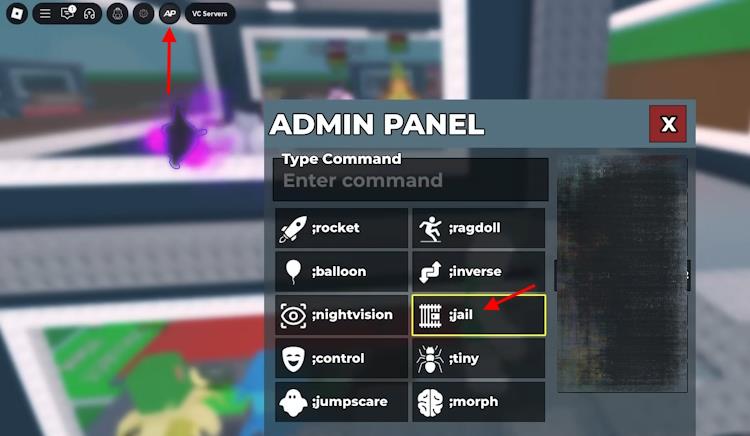
Purchase the Admin Commands game pass from the in-game Store tab for 5,000 to 7,499 Robux, depending on the latest pricing. A new AP icon then appears in the top-left corner of the screen. Click it to open the panel, where quick buttons for actions like Jail or Tiny sit alongside a text box for typing commands that begin with a semicolon, such as ;rocket followed by a player name.
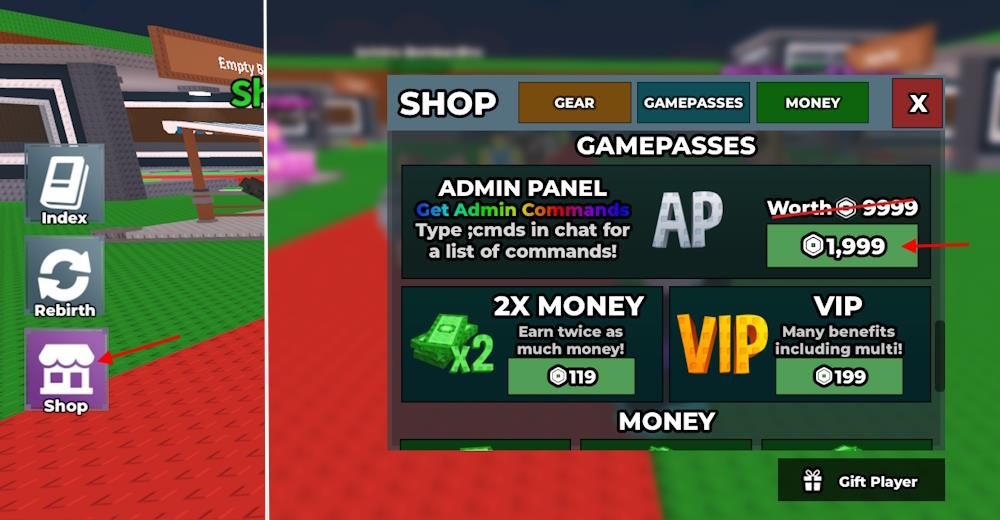
To use console commands, players must purchase the Admin Panel gamepass in Steal a Brainrot. It has a price of 1,999 Robux when discounted, which is often. If you see a different price for the gamepass, don’t be alarmed. My Editor saw the gamepass price as 4,999 Robux, while the original cost is 9,999 Robux.
Here is how you can get the Admin Panel gamepass in the game:
- Open Steal a Brainrot and click the Shop button on the left.
- Go to the Gamepasses tab and look for the Admin Panel.
- Click the Robux button and purchase the gamepass.
How to Use Admin Commands in Steal a Brainrot
To use admin commands in Steal a Brainrot, open the in-game chat by pressing “/” and type the command you want to use, followed by the required parameters. Some commands might need you to have admin privileges or a specific game pass before they work. Always check the proper syntax, since small mistakes like missing spaces or extra symbols can stop a command from running. If a command doesn’t work, verify that you’re using the correct format or confirm that it’s still active in the latest game update.
Once you have completed the purchase, you can use the admin panel with ease. To use the admin commands, type ‘;cmds‘ in the chat box. This will give you a list of all the console commands.
Alternatively, you can press the AP (admin panel) button from the top left menu to open the panel. Now, select the command you want to use, followed by the user you want to apply it to.
How to unlock the Admin Panel in Steal a Brainrot
To unlock the Admin Panel in Steal a Brainrot on Roblox, purchase the Admin Panel gamepass from the in-game shop, typically priced between 7,499 and 9,999 Robux depending on promotions. Once bought, an AP button appears in the top-left corner of your screen for easy access, or type commands directly in chat starting with a semicolon (;). Typing ;cmds displays the full command list after unlocking.
Purchase Steps
Open the Shop menu on the left side of the screen and navigate to the Gamepasses tab. Scroll to find “Admin Panel,” confirm the purchase with Robux, and it activates immediately-no restart needed. Server owners or developers may grant temporary access via Discord or private servers, but standard players require the gamepass.
Access Methods
Click the AP button to open the graphical panel for selecting commands and targets, or use chat like ;jail [playername] for quick execution. Effects apply to nearby players or yourself if no target is specified, enabling fun interactions like ragdoll or balloon effects. Prices and availability can vary with updates, so verify in-game as of January 2026.
How do I buy the Admin Commands Game Pass in Steal a Brainrot
To buy the Admin Commands Game Pass in Steal a Brainrot on Roblox, open the in-game Shop menu on the left side of the screen and switch to the Gamepasses tab. Locate the “Admin Panel” or “Admin Commands” option (prices vary: often 9,999 Robux standard, discounted to 1,999-7,499 Robux during promotions), then click the Robux purchase button to confirm via Roblox’s system. The pass activates instantly, adding an AP button in the top-left UI for access.
Step-by-Step Purchase
-
Launch Steal a Brainrot and join a server.
-
Click the Shop icon (left sidebar), select Gamepasses tab, and scroll to Admin Panel.
-
Tap the Robux price, review the prompt (costs ~$75-$100 USD equivalent), and buy-best deals via PC, web, or gift cards.
Post-Purchase Access
An AP button appears top-left for the graphical panel, or type ;cmds in chat for the command list. Server owners might gift access, but standard purchase is required; avoid unverified glitches from videos as they risk bans. Prices fluctuate with updates as of January 2026.
