Caring meets competition in Be a Nurse-the Roblox game where compassion earns coins. Use the latest July 2025 codes to grab free rewards, boost your progress, and climb the career ladder faster than ever.
But earning cash can be a grind, so use Be a Nurse codes from our list to obtain a ton of cash for free. Using free cash, you can buy a new dress and look more professional.
All New Be a Nurse Codes
The newest Be a Nurse codes bring fresh rewards to help players progress faster and customize their experience. Redeeming these codes can grant useful boosts, coins, or exclusive items that make gameplay smoother and more enjoyable. Keep an eye on official updates, as developers often release limited-time codes during events or special milestones.
- 12k_likES: 50 Cash (NEW)
- 5k_LiKES: 50 Cash (NEW)
- 1k_likes: 50 Cash (NEW)
- 100_LIKeS: 50 Cash (NEW)
- NEW: 100 Cash (NEW)
Expired Be a Nurse Codes
Currently, there are no expired codes in this Roblox Experience. The above codes will be moved to this section once they expire.
Take a break from tending to patients and try out growing stuff instead. Check out Grow a Garden, Grow Crystals, or Own a Fish Pond. Tired of taking care of things? Dip into some action with Anime Last Stand. Don’t stop here and take a look at our Roblox game codes list for hundreds of amazing games from different genres.
How to Redeem Be a Nurse Codes
To redeem codes in Be a Nurse, open Roblox and launch the game. Once loaded, find and click the code button, usually represented by a gift or settings icon on the screen. A text box will appear where you can enter a valid code. Type or paste the code carefully, then press “Redeem” to claim your rewards. If the code is active, the rewards will be added to your account instantly; otherwise, you’ll see an expiration or invalid message.
Taking care of your patients is a massive responsibility and requires a ton of elaborate steps. Thankfully, redeeming the codes for Be a Nurse is not nearly as complicated. Here is how you can redeem the codes in this game:
- Launch Be A Nurse in the Roblox Launcher.
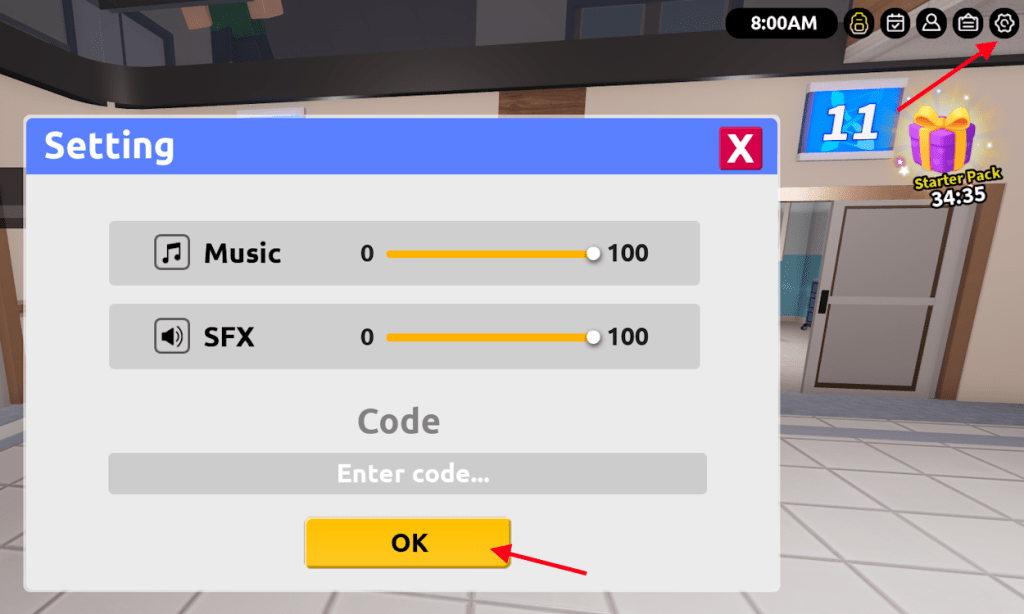
- Click on the Gear icon on the top right part of the screen to open Settings.
- Type the active code in the ‘Enter code…’ section.
- Click OK to claim the rewards.
How to Get More Be a Nurse Codes
Players can find new Be a Nurse codes by following the game’s official Roblox page, joining its Discord server, and checking the developer’s social media accounts for updates. Codes are often shared during milestone events, updates, or special promotions. It’s also helpful to revisit reliable fan sites or community boards where players post newly released codes shortly after they appear.
It is extremely important to be punctual for a nurse. So, keeping the true essence of a nurse in our hearts, we make sure to keep this code list always up to date. You will always find the currently active codes here without delay. Simply bookmark this post and be sorted whenever you want to check out new codes for Be a Nurse.
But if you have enough time on your hands and would rather search for the codes yourself, even then, we have you covered. Join the Be A Nurse Discord server to interact with others in the community and to stay updated on updates. This is also the place where the developers release new code. Other than that, you can also join the Blox ER Responders Roblox community to get upcoming event notifications.
How to redeem codes in Be a Nurse
To redeem codes in Be a Nurse on Roblox, you must use the in-game settings menu. The process is quick and allows you to instantly claim rewards like Cash to help progress your medical career.
Redemption Steps
-
Open the Game: Launch Be a Nurse through the Roblox app or website.
-
Access Settings: Click on the Gear icon (Settings), which is located in the top-right corner of your screen among several other utility buttons.
-
Enter the Code: Locate the text field at the bottom of the Settings menu labeled “Enter code…”.
-
Confirm: Type or paste your code into the field and click the golden “OK” button to receive your freebies.
Troubleshooting
If a code does not work, it is likely due to one of the following common issues:
-
Case Sensitivity: Codes must be entered exactly as they appear, including specific capitalization (e.g., 12k_likES).
-
Expiration: Codes in Be a Nurse are often time-limited or tied to specific milestones and may be deactivated without notice.
-
Typos: Double-check for extra spaces or spelling errors; copying and pasting directly from a source is recommended.
-
Server Version: If a brand-new code fails, try joining a different server or restarting the game to ensure you are on the latest build.
Show current working codes for Be a Nurse
The current active codes for Be a Nurse as of January 2026 provide players with free in-game Cash, which is used to purchase new nursing uniforms and medical equipment. Most codes grant 50 Cash each, though some promotional codes may offer up to 100 Cash.
Active Codes (January 2026)
| Code | Reward |
|---|---|
| CNA_boost | 50 Cash |
| 50_Likes_k | 50 Cash |
| K_25LIKES | 50 Cash |
| 12k_likES | 50 Cash |
| 5k_LiKES | 50 Cash |
| 1k_likes | 50 Cash |
| 100_LIKeS | 50 Cash |
| NEW | 50-100 Cash |
Redemption Checklist
To ensure your codes are processed successfully, follow these standard practices:
-
Case Sensitivity: Enter codes exactly as written; for example, 12k_likES requires specific letters to be lowercase and others uppercase.
-
Menu Location: Open the Settings (gear icon) in the top-right corner to find the “Enter code…” input box.
-
One-Time Use: Each code can only be redeemed once per account.
-
New Servers: If a newly released code does not work, try joining a different or newer server, as older servers may not have the updated code database yet.
Expired Codes
As of early 2026, there are currently no reported expired codes for Be a Nurse, meaning all previously released codes remain active for new players. Developers typically release new codes when the game hits major “like” milestones on Roblox.