Grab the newest Jump Stars codes for July 2025 and boost your Roblox gameplay with extra coins, power-ups, and exclusive items before they expire. Find every active code, learn how to redeem them, and stay ahead in the Jump Stars arena.
That’s why we’ve gathered all the latest Jump Stars codes to help you out with free gems, traits, and more. Use these rewards to power up quickly and start wrecking your opponents in no time.
All New Jump Stars Codes
Jump Stars players now have fresh codes for July 2025. Redeem them quickly to claim free boosts, gems, and power-ups that speed up your progress. These rewards give characters extra jumps, speed, and lives to dominate matches. Check back often since codes expire fast. Copy each one exactly as listed and paste into the game’s code box.
- 100kInterested: 1000 Gems (NEW)
- Arise: 1000 Gems (NEW)
- 100kMembersThanks: 2500 Gems (NEW)
Expired Jump Stars Codes
- 130klikes
- 100klikes
- 1mVisits
- 50klikes
- SorryForBugs
- Release
If you have had enough of Jump Stars, why not try out some of the other popular anime games, like Blox Fruits or Anime Shadow 2? If you simply like games related to anime sports, then Blue Lock Rivals and Basketball Zero are always great options. Other than that, you can always check our Roblox game codes master list to find any game that suits your taste.
How to Redeem Jump Stars Codes
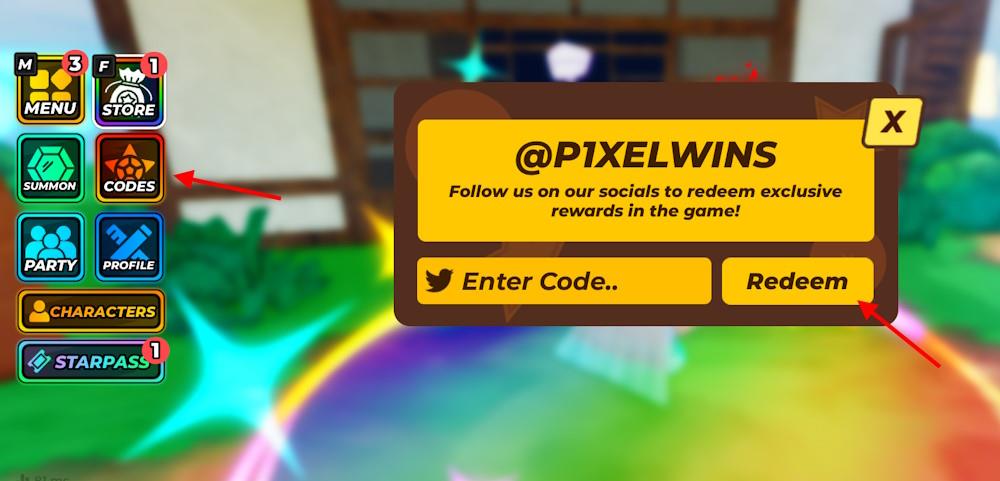
Open Jump Stars on Roblox and find the Settings menu, usually in the top-right corner or main lobby. Click the Codes button or icon to reveal the text box. Copy a valid code from our July 2025 list exactly as shown, paste it into the box, and hit Redeem or Enter. Rewards like cash or boosts appear right away if the code works. Check back monthly for fresh codes since they expire fast.
Redeeming codes in this experience is simple, but you must join the Jump Corp community on Roblox to get the rewards. Follow the step-by-step process to redeem the codes for Jump Stars:
- Open Jump Stars on the Roblox app.
- Click the Codes option on the left screen.
- Type a working code in the Enter Code area.
- Click the Redeem button to claim rewards.
Where to Find More Jump Stars Codes
You can usually find new Jump Stars codes through the game’s official social media pages, such as Twitter, Discord, and Roblox group posts. Developers often release fresh codes during updates, collaborations, or special events, so keeping an eye on those announcements helps you grab them early. Community forums and gaming websites that track Roblox games also share the latest codes regularly, making them handy sources to check from time to time.
It’s easy to get caught up in the visuals and mechanics of Jump Stars, even I did. That’s why it can get hard to go through official sources for the latest codes. To solve that for you, we regularly track news and announcements to update this list with the working codes for Jump Stars. As soon as a code expires, we remove it from the active section so you’re not wasting your time. Bookmark this page and check back often to stay ahead.
Of course, if you’re the type who likes to hunt solo like a true anime protagonist, you can hop into the official Jump Stars Discord server. Head to the #announcements or #update-log channel and scroll through for the newest drops. You can also follow @P1XELWINS on X for code announcements and game updates. If a code isn’t working, it might have expired, or your game might just need a quick restart.
How to redeem Jump Stars codes
To redeem Jump Stars codes in Roblox, open the game, press the Codes button, enter a valid code exactly as shown, and hit Redeem to claim your Gems.
Step-by-step redemption
-
Open Roblox, search for Jump Stars, and launch the game.
-
If you are new, complete the short tutorial so the UI fully unlocks.
-
Look for the Codes button on the left or top-right of the screen, then click or tap it to open the code window.
-
Copy and paste or carefully type a working code into the Enter Code box.
-
Press the Redeem button; if the code is valid and unused, a pop-up will confirm your rewards (usually Gems) were added.
Requirements and common issues
-
Some codes require you to join the official Jump Corp Roblox group before they work, so join it from the game’s Roblox page if a valid code keeps failing.
-
Codes are case-sensitive, can expire, and usually only work once per account; check for typos and try a different active code if you get an “invalid” or “expired” message.
Join the Jump Corp Roblox group to redeem codes
To redeem many Jump Stars codes, you must first join the official Jump Corp Roblox group, because some codes only work for group members and the redemption feature can be restricted if you are not in the group.
Why you need to join
-
Several guides note that certain Jump Stars codes either require group membership or will not redeem unless your account is in the game’s official Roblox group.
-
The official group is called Jump Corp, owned by the developer account P1XELWINS, and it serves as the main community hub for news, updates, and codes.
How to join Jump Corp
-
On the Roblox website or app, search for the Jump Stars experience, open its page, and click the developer/group link to go to the Jump Corp group.
-
On the Jump Corp group page, press Join; once your membership is approved (usually instant), you can launch Jump Stars and redeem codes as normal from the in-game Codes menu.
