Cosmetic items in Grow a Garden add a personal touch to your Roblox garden, but finding and placing them isn’t always straightforward. Here’s how to access your collection, position decorations just right, and make your garden stand out from everyone else’s.
Now, if you have bought some of these decorative pieces, learn how to access the cosmetic items in Grow a Garden and how to place them in your plot.
How to Get Cosmetic Items in Grow a Garden
Cosmetic items in Grow a Garden can be earned or purchased through several methods. Players often receive them as rewards for completing quests, achievements, or limited-time events. Some items are available through in-game shops, where they can be bought using coins, gems, or event tokens. Trading with other players may also allow access to rare cosmetics, depending on the server’s trading rules. Keeping an eye on seasonal updates and special promotions helps you find unique items before they’re gone.
Grow a Garden has added a Cosmetic Shop to enable you to buy all the newly added cosmetic items. It is located between the Gear Shop and the Pet Eggs Shop. So, you can either use the recall wrench to transport directly in front of the Gear Shop and turn left, or simply walk over there and interact with the Sam NPC.
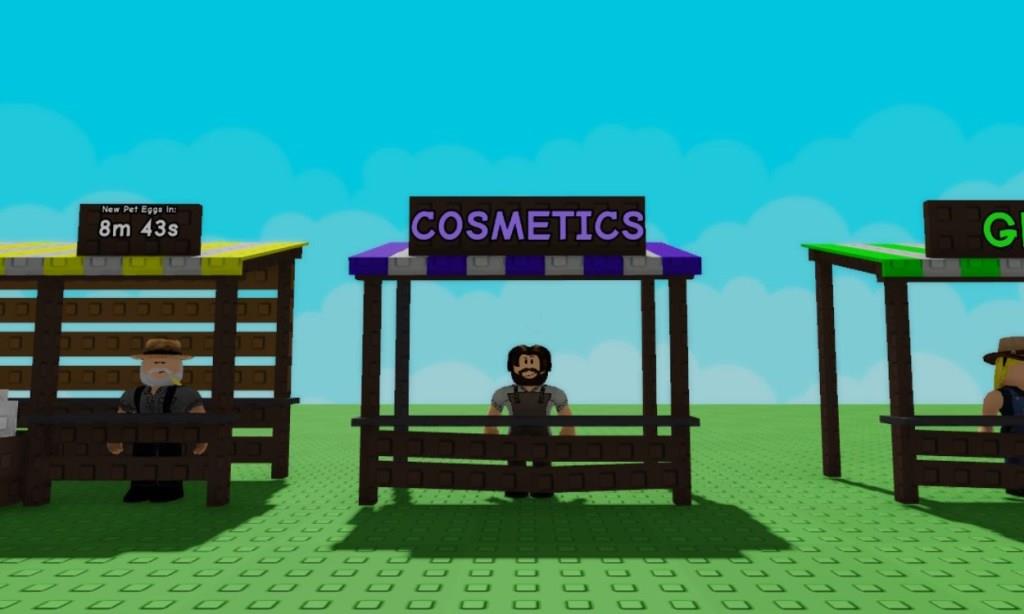
Pressing the E key (on PC) near the Sam NPC will open up a pop-up window that shows the current stock of cosmetic items. You will find a 10-hour restock timer at the top of the window, similar to the seed and gear shop, that will inform you when new items will be restocked.
Furthermore, you can check out all the cosmetic items in Grow a Garden to learn about the things available to buy. We have mentioned the price of all the items, along with their images, where most Common and Uncommon items can only be bought using Sheckles. The Rare and Legendary items provide a secondary option to spend Robux as well.
How to Open Crates in Grow a Garden
Crates in Grow a Garden contain various cosmetic items that enhance your character’s appearance. To open them, go to your inventory menu and select the crate you wish to open. Once chosen, click the “Open” button to reveal a randomized reward. Some crates may require specific keys or in-game currency, which can be obtained through gardening tasks, achievements, or purchases.
Among all the cosmetic items you can buy, there are options to buy various crates as well that can give access to Signboards, Gnomes, or other fun items. You will find them at the Cosmetic Shop, except for the Exotic Cosmetic Crate that can be bought only using Robux via the in-game shop.
So, once you get them, follow the steps below to place and open a crate in Grow a Garden:
- Stand near an empty area in your garden and press the Backpack icon on top to open your inventory.
- Search for the specific crate you want to place by typing the name in the search box.
- Left-click on the crate to hold it in your hand and press the left mouse button on an empty area to place it there.
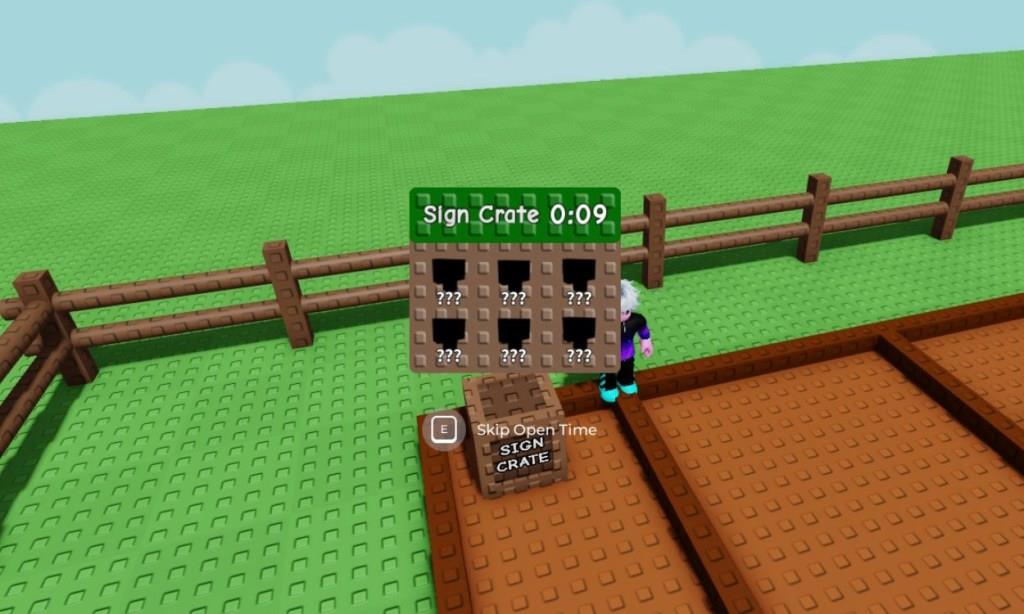
Similar to pet eggs, placing the crate down will start a timer that will be displayed on top of it.
How to buy cosmetics from the Cosmetic Shop
In Grow a Garden on Roblox, buying cosmetics from the Cosmetic Shop involves interacting with the Sam NPC at the shop located between the Gear Shop and Pet Eggs area. Players use Sheckles (in-game currency) or Robux to purchase items directly, with stock refreshing every 10 hours.
Finding the Shop
Head to the Cosmetic Shop in the central hub area of the game world. Approach the Sam NPC stand and press E on PC (or tap on mobile) to open the purchase menu displaying available statues, gnomes, signs, and other decorations.
Purchasing Process
Select the desired cosmetic from Sam’s inventory list, then confirm the buy with your Sheckles balance or Robux payment option. Items appear instantly in your Tools backpack for placement, though some require a brief equip timer.
Tips for Buying
Check stock frequently due to the 10-hour restock cycle, and consider cosmetic crates as an alternative for random unlocks after placing and opening them in your garden. Prices vary by rarity, starting low for basic items.
Current discounts at Cosmetics Company Store
The Cosmetics Company Store, an outlet retailer for Estée Lauder brands like MAC and Clinique, offers ongoing multi-item discounts at many physical locations: 25% off for one product, 30% off for two, and 40% off for three or more (applied at checkout on recommended prices).
Online Promotions
Coupon sites list up to 70% off via promo codes (e.g., 55% or 45% on select items), though reliability varies-email sign-ups often yield 5% off first orders, with free shipping over $100.
In-Store Deals
Tiered savings apply widely (e.g., extra 10-15% off for 4+ items), plus seasonal events like Black Friday or clearance sales; check local outlets for current stock and expiration dates on products.
