Training your reflexes and sharpening your focus just got more rewarding – the latest Brainrot Training codes for April 2025 are here, packed with boosts to speed up your progress across Roblox’s toughest habit games.
Need some help along the way? Use our list of new Brainrot Training codes to obtain free trophies, gems, and weapons. You can use these rewards to gain an edge over your opponents.
All New Brainrot Training Codes
Stay updated with the latest Brainrot Training codes for April 2025 to boost your progress and claim free rewards. These new codes can grant items, in-game currency, or exclusive boosts that help you advance faster during your training sessions. Keep an eye on this list, as developers release new codes regularly and expire old ones without warning.
- release: 100 Trophies, 1 Rare Weapon (NEW)
- welcome: 50 Gems, 1 Rare Weapon (NEW)
Expired Brainrot Training Codes
Currently, there are no expired codes for Brainrot Training. As the game is still new, all the codes are still active. Once a code expires, we will move it here.
While you wait for new codes to arrive, why not try out other Brainrot games? The genre is filled with interesting games like Brainrot Evolution, with an active player base. If your brainrot no longer stimulates you, try out popular games like Blue Lock Rivals, Basketball Zero, or Anime Rangers X instead. Want even more? Check out our Roblox game codes master list for more.
How to Redeem Brainrot Training Codes
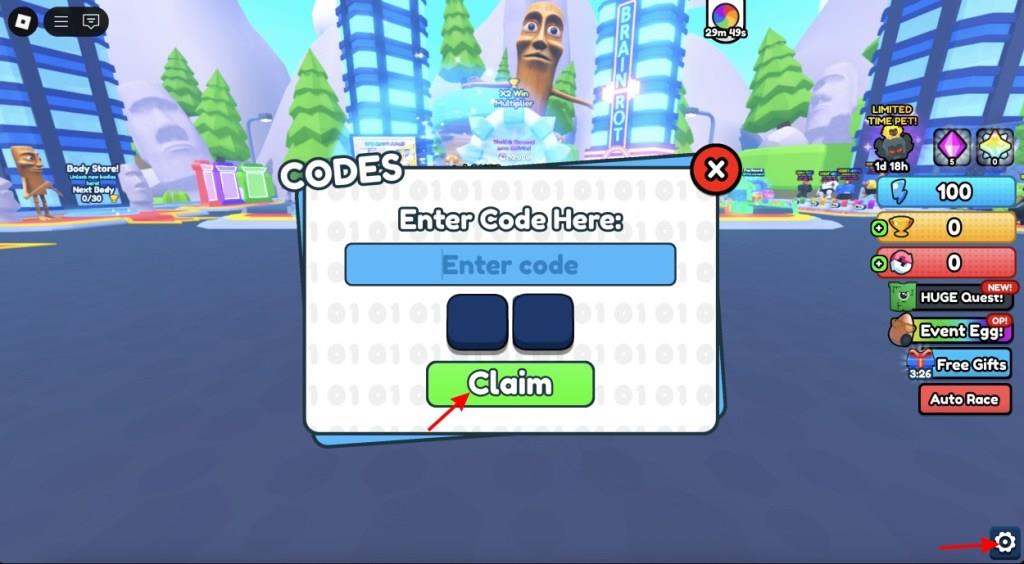
To redeem Brainrot Training codes, open Roblox and launch the game. Once you’re in the main lobby, look for the “Codes” button, usually found on the screen’s side or in the settings menu. Click it to open the redemption window, then type or paste an active code into the text box. Press “Redeem” to confirm, and the rewards will instantly appear in your account, such as boosts, coins, or special items.
Redeeming codes for Brainrot Training is as simple as training your character in the game. Simply follow the steps below:
- Start Brainrot Training in the Roblox player.
- Click on the Settings icon at the bottom right corner.
- Now, select the Codes option.
- Input a working code in the textbox.
- Click on Claim to get your rewards.
How to Get More Brainrot Training Codes
Boost your collection of Brainrot Training Codes with a few reliable strategies: check official announcements and event pages for limited-time codes, follow the game’s social channels for drop alerts, trade with other players in designated communities, and participate in in-game activities or challenges that grant codes as rewards.
The best way to stay on top of the latest Brainrot Training codes is by bookmarking our post. We update the codes regularly, adding the latest released codes while removing the expired ones. You won’t get a better place to find the active codes without hassle than our codes list.
However, if you are still not convinced and would rather want to check for codes yourself, join the official Habit Games Discord server or follow the Plaincamron X account. The codes are generally released in the “announcement” channel of the Discord server. You can also join the Habbit Games Roblox community to get notified about the latest announcements.
Where to find new Brainrot Training codes first
The primary source for new Brainrot Training codes is the official Habit Games Discord server, particularly the announcements or game-news channel where developers post them first during updates.
Key Sources Ranked by Speed
-
Habit Games Discord: Codes drop here instantly with updates; join for real-time notifications in dedicated channels.
-
Developer’s X/Twitter (@plaincamron): Frequent posts about new codes alongside milestones or patches.
-
Roblox Group Page: Check the Habit Games group for pinned announcements on the game.
Secondary Checks
Guide sites like Beebom, Pro Game Guides, and EGamersWorld update shortly after official drops, but always verify against Discord first.
YouTube videos from creators often compile codes soon after release, though they lag behind official channels.
Follow the game’s official Discord announcements channel
To stay updated on Brainrot Training codes via the official Discord, join the Habit Games server and navigate to its announcements channel where developers post new codes first during updates.
Steps to Follow Announcements
-
Join the Habit Games Discord server (search for it via Discord’s server discovery or links from Roblox group pages).
-
Locate the announcements or #game-news/#updates channel, identifiable by its megaphone icon if it’s an official Announcement Channel type.
-
Right-click (or long-press on mobile) the channel header and select Follow to receive posts directly in a designated channel on your own server for instant notifications without constant checking.
-
Enable notifications for that followed channel to get pings on new code drops, patch notes, or events.
Tips for Official Channels
Announcement channels push messages cross-server only if the poster uses the Publish button, ensuring reliable delivery.
Check server rules to avoid missing pinned invite links or verification steps required for full access.