Collect free rewards, boosts, and rare items this February with the newest Verse Piece codes for Roblox. Stay updated so you don’t miss limited-time bonuses that can power up your crew and sharpen your next adventure.
We have compiled all the working Verse Piece codes that will give you free chests, stat resets, and many other in-game resources. Utilize these rewards to get stronger in the game and challenge high-tier enemies.
All New Verse Piece Codes
Check the latest Verse Piece codes added this month. Redeem them now for free gems, boosts, and spins to power up your character. Active codes include UPDATE15 for 15 spins and 500 gems, NEWYEAR2025 for 20 spins and 1000 gems, and BOOSTER10 for double boosts over 30 minutes. Open the game menu, enter each code exactly as shown, and hit redeem before they expire. Stay updated via the official Discord or social channels for more drops.
- !code 5FEB (NEW, requires level 2500)
- !code VoxVsRestize (NEW)
- !code 8KActive (requires Max level)
- !code Monarch (requires level 5000)
- !code LosLobos (requires level 5000)
- !code 5MVisits (requires level 5000)
- !code WallIsOver (requires level 5000)
- !code NoMore
- !code 20KLikes
- !code 10KFavs
- !code Replay (requires max level)
- !code HNY2025
- !code BuggyPiece (requires level 5000)
- !code HolidayEvents (requires level 5000)
- !code Xmas (requires level 50000)
- !code RESTIZEALIVE (requires level 5000)
- !code TradeBug (requires level 5000)
- !code 20KMembers
- !code 2MVisits
- !code 10KLikes
- !code 7KLikes (requires level 5000)
- !code NukeAtomic (requires level 5000)
- !code 4KLikes (requires level 5000)
- !code AnotherVerse (requires level 5000)
- !code VoxSmart (requires level 5000)
- !code 4KFavs
- !code Delay
- !code VERMILLION
- !code 3500Likes
- !code TrickOrTreat
- !code 1MVisits!
- !code RobloxDown (requires level 5000)
- !code ChestDrop (requires level 5000)
- !code NomoreChestDrop (requires level 5000)
- !code Rengoku (requires level 5000)
- !code Exclusive (requires level 5000)
- !code Judge (requires level 5000)
- !code ShutdownPiece (requires level 5000)
- !code NoCap (requires level 5000)
- !code 500KVisits
- !code DelayPiece
- !code Locked
- !code Delayed (requires level 3000)
- !code Enhance (requires level 3000)
- !code UPDATE2PART1
- !code 1.5KFavs
- !code LastShutdown
- !code 350KVisits
- !code 1KLikes
- !code SorryReallyLate (requires level 3000)
- !code SorryForShutdown (requires level 3000)
- !code 250KVisits (requires level 3000)
- !code 750Likes (requires level 3000)
- !code SorryForBug (requires level 3000)
- !code IAmHere (requires level 3000)
- !code 500Favs (Only in new servers)
- !code 100KVisits (requires level 3000)
- !code PerfectlyPlanned
- !code Update1
- !code SorryForLate
- !code 1KActives
Expired Verse Piece Codes
- !code DelayPiece
- !code 500KVisits
- !code UPDATE2PART1
- !code 1.5KFavs
- !code 500Favs
- !code LastShutdown
- !code PerfectlyPlanned
- !code SorryForLate
- !code Update1
- !code 1KActives
- !code ObitoTV
- !code ValkIsHere
- !code MiniUPD
- !code 2KVisits
- !code SorryForBuggy
- !code 10KVisits
The developers share codes regularly so you won’t have to wait for the new ones that often. However, if you want to try some more One Piece action on Roblox, I recommend you try Blox Fruits or Fruit Battlegrounds. You can also check out our Roblox game codes master list and pick your next adventure.
How to Redeem Verse Piece Codes
To redeem Verse Piece codes, open Roblox and launch the game. Click the menu icon on the side of the screen, then select the “Codes” option. Copy a working code from the latest list and paste it into the text box. Press the “Redeem” button to claim your rewards. Make sure the code is entered exactly as shown, since they are case-sensitive and may expire after a short time.
While redeeming the codes for Verse Piece is simple, you must reach a certain level for a handful of them. You can check the required level on our working codes list. Once you reach the level, follow the steps below and claim your rewards:
- Launch Verse Piece in the Roblox app.
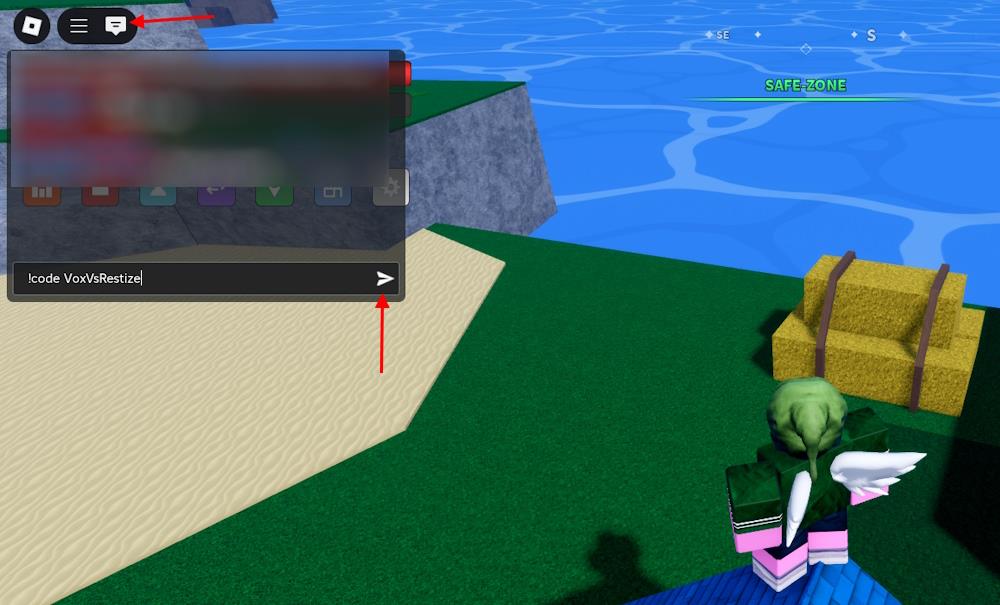
- Click the chat button from the top left corner.
- Type an active code from our list in the chat box.
- Press send or the Enter key to claim rewards.
How to Find More New Verse Piece Codes
Players can find new Verse Piece codes by checking the game’s official social media accounts, such as X (Twitter), Discord, and YouTube, where developers often share the latest updates and rewards. Joining the game’s community servers is another reliable way to catch fresh codes quickly, as active players frequently post them there. It’s also helpful to follow Roblox code websites or fan pages that update their lists regularly, especially after events, milestones, or new patch releases.
As already mentioned above, the developers share a new code for the game frequently. So, you would not want to miss out on them as soon as they arrive. We scavenger hunt the codes for you regularly. That is why, we suggest you bookmark this page to stay on top of the Verse Piece codes.
If you want to check the codes out by yourself, you can follow the official socials for Verse Piece. The best place to find them is the Verse Piece Discord server. In the server, you can find the codes in the ‘updates’ channel. You can also follow the [Vermillion] community on Roblox to learn more about the game.
How to redeem codes in Verse Piece step by step
Redemption requires a high-level character, often level 3000-5000, as codes won’t activate otherwise. Follow these steps precisely in Verse Piece on Roblox.
Step-by-Step Guide
-
Launch Verse Piece and ensure your character meets the code’s level requirement (check guides for specifics, like 5000 for many).
-
Click the chat icon in the top-left corner of the screen, or press the “1” key on your keyboard.
-
Type the code exactly as listed, starting with “!code” (e.g., !code 5FEB)-codes are case-sensitive.
-
Press Enter or the send arrow to submit; rewards like chests or rerolls appear instantly if valid.
Troubleshooting Tips
Codes fail mainly due to low levels, typos, or expiration-double-check capitalization and level. No dedic
Open Verse Piece and show where the chat button is located
Launch Verse Piece on Roblox to access the main game screen. The chat button is in the top-left corner among a row of icons.
Locating the Chat Button
Look at the upper-left area of your screen for several buttons in a horizontal row. The chat button is the last (rightmost) one, featuring a dialog box or speech bubble icon-often white or gray. Click it or press the “1” key to open the chat input field.
Visual Guide
No screenshots are directly embedded here, but gameplay videos show it clearly: top-left row ends with the chat icon next to menu or settings buttons. Ensure you’re not in a menu or loading screen, as the UI appears post-spawn on starter islands.