Set sail for success in Raft Tycoon with the latest March 2025 codes-snag fresh rewards, boost your island empire, and power up your Roblox adventure before they expire.
Let’s solve that problem for you with a list of new Raft Tycoon codes you can use to get free cash. You can use it to upgrade your raft and venture further.
All New Raft Tycoon Codes
New Raft Tycoon codes bring players fresh rewards such as cash boosts and exclusive items to speed up progress and expand rafts faster. These codes help both beginners and regular players grow their tycoons without extra grinding. Be sure to redeem each code as soon as possible, since they often expire quickly and new ones appear with upcoming updates or seasonal events.
- CodeCash: Redeem for 15k cash (NEW)
- Rafting: Redeem for 50k cash (NEW)
- Flappy: Redeem for 25k cash (NEW)
- Seaside: Redeem for 5k cash (NEW)
- Chillguy: Redeem for 5k cash
- Christmas24: Redeem for 5k cash
- Releases: Redeem for 2.5k cash
Expired Raft Tycoon Codes
Currently, there are no expired Raft Tycoon codes in this game. However, if you want to try out other genres, have a look at our Roblox codes master list. If tycoon games attract you the most, check out Restaurant Tycoon 2 and Military Tycoon as well.
How to Redeem Raft Tycoon Codes
Use your Raft Tycoon codes from the game or the official sources, then redeem them in the in-game codes menu to claim rewards. If a code has expired, try alternatives from ongoing events or recent announcements.
Redeeming codes for Raft Tycoon is as easy as building your mansion inside it. Follow these steps to claim the rewards:
- Launch Raft Tycoon on Roblox.
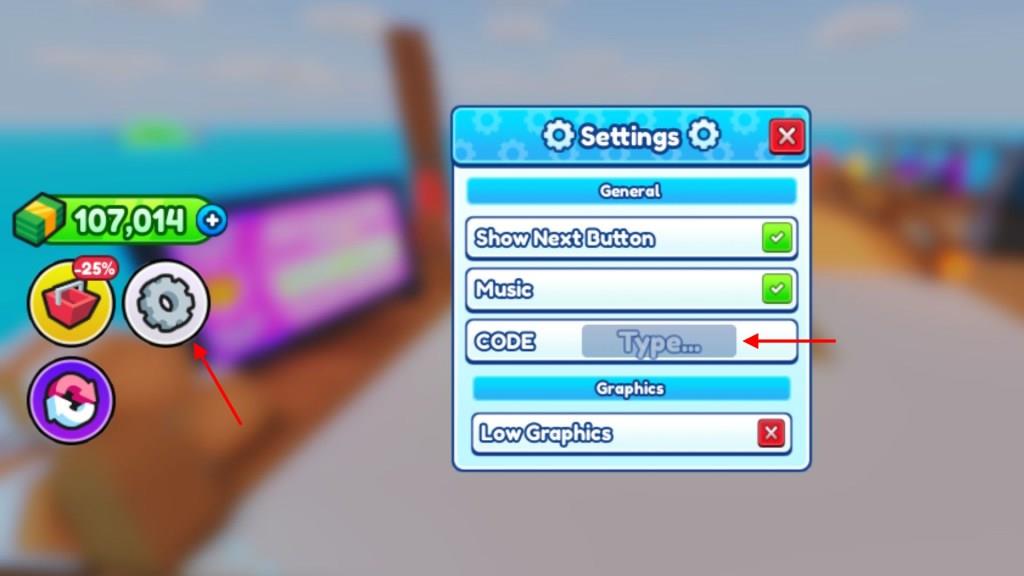
- Click on the Gear icon on the left side of the screen.
- Enter a working code in the text box.
- Press Enter to get your rewards.
How to Get More Raft Tycoon Codes
New Raft Tycoon codes are usually shared by the game’s developers on social media platforms like X (Twitter), Discord, or the official Roblox group. Players can follow these channels to catch new updates and limited-time rewards as soon as they appear. Joining community servers or forums can also help, as other players often share newly released codes quickly. Staying active in events and checking in-game announcements is another good way to find fresh codes before they expire.
Looking out for the latest Raft Tycoon Codes will be a lot easier once you bookmark this page. As we keep updating our codes lists, you will never have to worry about missing out.
Apart from this, you can consider joining the official Raft Tycoon Discord server and check the announcements and codes channel for new updates. Furthermore, do join the Raft Tycoon Roblox community to stay up to date on all sorts of game news and get some additional rewards.
How do I redeem codes step by step in Raft Tycoon
Raft Tycoon on Roblox features a straightforward code redemption system accessible via the in-game settings menu. Follow these steps exactly to claim rewards like free cash, noting that codes are case-sensitive and one-time use per account.
Step-by-Step Guide
-
Launch Raft Tycoon through the Roblox platform and join your server.
-
Locate the gear icon (cogwheel or settings button) on the left sidebar of the screen, below the currency counter.
-
Click the gear to open the Settings menu, where a “Type Code” or empty text field appears in the center.
-
Copy and paste (recommended) or type a valid code exactly into the field-no spaces or alterations.
-
Press Enter on your keyboard to submit; a success message confirms rewards added instantly.
Troubleshooting Tips
Codes may fail if expired, already redeemed, or mistyped-double-check spelling and test in a private server if issues persist. Developers like Flappy Bit Games release updates via Discord or Roblox group, so verify codes there for January 2026 validity.
How do I redeem codes step by step in Raft Tycoon
Raft Tycoon on Roblox uses a simple in-game menu for redeeming codes to claim free cash rewards. Codes must be entered exactly as shown, since they are case-sensitive and typically one-time use per account.
Step-by-Step Redemption
-
Launch Raft Tycoon via the Roblox player and enter any server.
-
Find the gear icon (cogwheel or settings button) on the left sidebar, usually below the cash counter.
-
Click the gear to open the Settings menu, revealing a “Type Code,” “Type,” or empty text field in the center.
-
Copy-paste or type a valid code into the field without extra spaces.
-
Press Enter on your keyboard to submit; rewards appear instantly with a success message.
Common Fixes
Mistakes like typos, prior redemption, or expiration cause failures-recheck spelling and try private servers if needed. Join the developers’ Discord for latest codes, as updates can change the process slightly.